Bing AI Performance Report: How to Track AI Citations in Bing Webmaster Tools
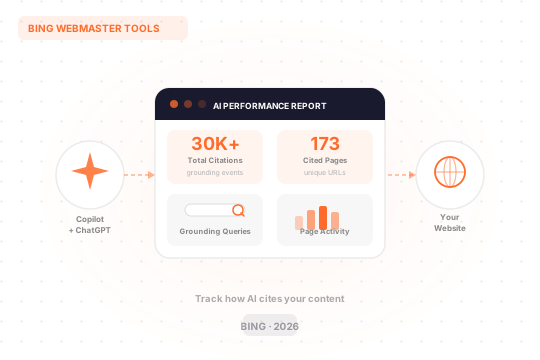
Search is changing quietly but quickly.
More people are getting answers directly from AI tools like Microsoft Copilot, ChatGPT, Perplexity, without clicking on any links at all. For businesses and publishers, this creates a real problem: how do you know if your content is even showing up in those AI answers?
Until recently, you had no way to find out. You could only guess.
That changed in February 2026, when Microsoft launched the AI Performance report inside Bing Webmaster Tools. It is currently in public preview, and it is the first time any major search platform has given website owners actual data on how their content is being cited by AI systems.
This guide explains what the report shows, how to use it, and what the data means for your site.
Why AI Citations Matter Now
When someone asks Copilot a question, Copilot does not just make up an answer. It searches the web, pulls from pages it considers trustworthy and relevant, and uses that content to build a response. The pages it uses are called citations.
Your site might be cited frequently without you knowing it. Or it might never get cited at all, even if you rank well in traditional search results. Those are two very different situations, and up until now, you had no way to tell them apart.
Traditional SEO metrics like clicks, impressions, and rankings do not capture this. They measure visibility in blue-link search results, not in AI-generated answers.
As AI becomes a more common way people discover information, visibility is not only about blue links. It is also about whether your content is cited and referenced when AI systems generate answers.
That is the gap the AI Performance report is designed to fill.
What Is the AI Performance Report?
The AI Performance report is a new dashboard inside Bing Webmaster Tools. It tracks citation visibility across supported AI surfaces. Instead of measuring clicks or rankings, it shows whether your content is used to ground AI-generated answers.
It covers AI experiences across Microsoft Copilot, AI-generated summaries in Bing, and select partner integrations.
You can find it directly at bing.com/webmasters/aiperformance once you are logged into your Bing Webmaster Tools account.
No extra setup is required. If your site is already verified in Bing Webmaster Tools, the report is ready for you to explore.
The Four Key Metrics
The dashboard shows four main things. Here is what each one actually means.
1. Total Citations
This is the headline number. It tells you how many times your site was cited as a source in AI-generated answers during your chosen time period.
A higher number means your content is being pulled into AI responses more often. A flat or declining number suggests your content may not be seen as relevant or current enough for the topics being asked about.
This highlights how often your content is referenced by AI systems, without indicating placement or presentation within a specific answer. So it does not tell you where in the answer your content appeared, just that it was used.
2. Average Cited Pages
This shows how many unique pages from your site are being cited per day, on average.
If only one or two pages are getting cited repeatedly, that tells you something. Either those pages are genuinely your strongest, or the rest of your site is not structured in a way that AI systems can use easily.
Average cited pages reflect overall citation patterns and do not indicate ranking, authority, or the role of any page within an individual answer.
3. Grounding Queries
This is arguably the most interesting metric in the report.
When Copilot needs to answer a user’s question, it does not just search that exact question. It breaks the question down into shorter, more specific sub-queries to find relevant sources. Those sub-queries are what Bing calls grounding queries.
The AI Performance report reveals the actual queries Copilot uses to find your content.
For example, if a user asks “what is the best accounting software for a small business in India,” Copilot might generate grounding queries like “accounting software small business India” or “cloud invoicing tools India 2025.” If your pages are being cited because of those queries, you will see them here.
This data is genuinely useful. It shows you which topics Copilot associates with your site, which can inform your content strategy directly.
The data shown represents a sample of overall citation activity. Bing will continue to refine this metric as additional data is processed. So treat it as directional for now, not exact.
4. Page-Level Citation Activity
This breaks citations down by individual URL.
You can see which specific pages are being cited most often. This reflects how often pages are cited, not page importance, ranking, or placement.
This is where the data gets practically useful. If a page is getting cited a lot, study it. What makes it work? If a page is barely cited despite covering an important topic, that is a signal to improve it.
How to Access the Report
Getting started is straightforward.
If you are already using Bing Webmaster Tools with a verified site, you can access the AI Performance report right now. Just log in and navigate to the AI Performance section, or go directly to bing.com/webmasters/aiperformance.
If you are not yet set up on Bing Webmaster Tools, here is what to do:
- Go to bing.com/webmasters
- Sign in with a Microsoft account
- Add and verify your site (you can also import directly from Google Search Console, which saves time)
Up to 100 sites can be imported at once. Sites are automatically verified as part of the import process.
Once your site is verified, the AI Performance report becomes available immediately, though it may take some time to populate with data.
How to Read the Data Practically
Having the data is one thing. Knowing what to do with it is another.
Here are some practical ways to use what the report shows you.
Start with your most-cited pages. Look at which URLs are getting the most citations. These are your strongest pages from an AI citation perspective. Understand why they work. Are they well-structured? Do they answer a specific question clearly? Do they have recent, accurate information? Apply those same qualities to other pages.
Look at grounding queries for content gaps. The grounding queries section shows what Copilot is actually looking for when it pulls from your site. If you see queries that are close to topics you cover but are not quite landing on your pages, that is a content gap worth filling.
Track trends over time. If you notice a sudden drop, it can be a signal to review recent changes on your site or check if competitors are publishing better content on the same topics. The trend line is a simple but useful health check.
Look for pages with low citations on important topics. If a page covers something central to your business but rarely shows up in citations, it may need work. Improving the structure, adding clearer headings, updating outdated information, and making answers easier to extract can all help.
What the Report Does Not Tell You
Being honest about the limitations here matters.
Bing Webmaster Tools still won’t reveal how those citations translate into clicks, traffic, or any real business outcome. Without click data, publishers still can’t tell if AI visibility delivers value.
That is a real gap. You can see that your content is being cited, but you cannot yet see whether those citations are sending people to your site.
This is an early-stage tool. Microsoft has said it will continue improving the data over time. For now, the report gives you directional signals, not complete answers.
That said, even directional signals are better than nothing. Before this report existed, there was no way to measure AI citation activity at all.
What Makes Content More Likely to Get Cited
The AI Performance report tells you what is happening. The next question is what you can do to improve it.
The patterns are consistent with what makes content useful in general.
The guidance mirrors familiar best practices: clear headings, evidence-backed claims, current information, and consistent entity representation across formats.
A few things are worth paying attention to specifically:
- Fresh content performs better. AI systems prefer current information. Pages that have not been updated in a long time may lose out to newer, more accurate alternatives.
- Structure matters a lot. Content that is easy to scan, with clear headings and direct answers, is easier for AI systems to extract and use.
- Specificity helps. Broad, general pages are harder to cite for specific questions. Pages that answer a specific question well tend to do better.
- IndexNow can help your content get picked up faster. IndexNow helps keep information fresh across search and AI experiences by notifying participating search engines whenever content is added, updated, or removed. This means AI systems are more likely to reference your most current content.
How Bing Compares to Google on This
It is worth noting that Google has not offered anything comparable yet.
Google includes AI Overviews and AI Mode in Search Console’s overall Performance reporting, but it doesn’t offer a dedicated AI Overviews or AI Mode report or citation-style URL counts. Bing’s dashboard goes further. It tracks which pages get cited, how often, and what phrases triggered the citation. That gives you data to work with instead of guesses.
This does not mean Bing is more important than Google. It is not, in terms of raw search volume. But Bing’s index matters more than most people realise.
Because Microsoft owns roughly 49 percent of OpenAI, those systems lean heavily on the Bing crawl. ChatGPT’s Browse with Bing mode and Copilot’s web answers both pull fresh passages from the Bing index.
So having good visibility in Bing’s index, and being cited regularly in its AI answers, has knock-on effects that extend well beyond Bing search traffic alone.
A Note on Real-World Data
One SEO platform that analysed its own data after the AI Performance report launched found some useful patterns.
Over three months, 647 unique grounding queries triggered Copilot to use their content, generating over 30,000 total grounding events across 173 pages.
What they found was that vertical-specific queries and feature-specific questions drove the most citations. That aligns with what most content strategists would expect: pages that speak directly to a specific question or use case tend to perform better than broad overview pages.
Building Visibility That Lasts
The Bing AI Performance report is a useful tool, but it is also a reminder of something bigger.
Search has always rewarded content that is genuinely helpful, well-structured, and trustworthy. What is changing is where that content appears. Instead of just showing up in a list of blue links, your content now has the potential to be directly cited inside an AI-generated answer that someone reads instead of a search results page.
That is a shift worth taking seriously. The foundations, however, have not changed. Sites that have invested in clear writing, accurate information, strong structure, and consistent updates are the ones that tend to earn citations. Not because they have gamed a system, but because they have built something worth citing.
The AI Performance report gives you a way to measure how well you are doing on that front, at least within Bing’s ecosystem. Use it as one input among many, stay consistent with the work that builds real authority, and treat each piece of content as something that might need to answer a question clearly and completely.
That approach worked before AI search existed. It works now. It will likely keep working.

Performance Marketing Lead at PS Digital. He breathes numbers, bends spreadsheets with macros, and plays the ROAS flute with style. Based out of Uttarakhand, he is obsessed with ROI and constantly nudges the cost per conversion lower across Google, Meta, LinkedIn, and Bing.
More from the blog.
Let's talk about your growth.
Get actionable digital marketing insights delivered, or work directly with our team on your strategy.